이 글은 누구를 위한 것인가
- 새 기능이 지표를 개선하는지 확인하는 체계 없이 배포하고 있는 모바일 팀
- Firebase Remote Config를 쓰고 있지만 체계적인 A/B 테스트 설계를 못하고 있는 개발자
- "이 기능 효과 있나요?"라는 질문에 데이터로 답해야 하는 프로덕트 엔지니어
A/B 테스트 없이 기능을 릴리스하면
- 새 온보딩 플로를 출시했는데 전환율이 하락해도 원인을 모른다
- 리디자인이 "좋아 보이는" 것과 "실제로 전환율을 높이는" 것은 다르다
- 롤백 기준이 없어서 "조금 더 지켜보자"가 반복된다
A/B 테스트는 사용자를 두 그룹으로 나눠 하나의 변수만 바꾸고 결과를 측정하는 실험이다.
1. Firebase Remote Config 기초
Remote Config는 서버에서 앱의 동작·UI를 제어하는 키-값 저장소다. 앱 업데이트 없이 기능 플래그와 실험을 제어할 수 있다.
초기화
// iOS (Swift)
import FirebaseRemoteConfig

func setupRemoteConfig() {
    let remoteConfig = RemoteConfig.remoteConfig()

    let settings = RemoteConfigSettings()
    settings.minimumFetchInterval = 3600  // 1시간 (프로덕션)
    // settings.minimumFetchInterval = 0  // 개발 환경
    remoteConfig.configSettings = settings

    // 기본값 설정 (오프라인/fetch 실패 시 사용)
    remoteConfig.setDefaults([
        "new_checkout_flow_enabled": false as NSObject,
        "button_color": "blue" as NSObject,
        "max_cart_items": 10 as NSObject,
    ])
}

// 앱 시작 시 fetch + activate
func fetchRemoteConfig() async {
    do {
        let status = try await RemoteConfig.remoteConfig().fetchAndActivate()
        print("Remote config fetch status: \(status)")
    } catch {
        print("Remote config fetch failed: \(error)")
    }
}
// Android (Kotlin)
class RemoteConfigManager(private val remoteConfig: FirebaseRemoteConfig) {

    fun initialize() {
        val configSettings = remoteConfigSettings {
            minimumFetchIntervalInSeconds = 3600
        }
        remoteConfig.setConfigSettingsAsync(configSettings)

        remoteConfig.setDefaultsAsync(
            mapOf(
                "new_checkout_flow_enabled" to false,
                "button_color" to "blue",
                "max_cart_items" to 10L,
            )
        )
    }

    suspend fun fetchAndActivate(): Boolean {
        return remoteConfig.fetchAndActivate().await()
    }
}
2. Feature Flag 계층 설계
A/B 테스트 전에 Feature Flag 시스템을 먼저 갖춰야 한다.
Feature Flag 계층

1. 킬 스위치 (Kill Switch)
   └─ 긴급 비활성화용. 실험과 무관하게 즉시 끔.

2. 점진적 롤아웃 (Gradual Rollout)
   └─ 0% → 10% → 50% → 100%로 단계적 배포

3. 사용자 타게팅 (User Targeting)
   └─ 특정 조건(플랜, 지역, 버전)의 사용자만 활성화

4. A/B 실험 (Experiment)
   └─ 위 모든 것을 포함하며 지표 측정을 포함
Firebase Remote Config + Conditions로 타게팅
Firebase Console에서 조건(Condition) 설정:
  - 앱 버전 >= 2.5.0
  - 사용자 속성: subscription_tier == "premium"
  - 기기: iOS
  - 지역: KR, JP
3. A/B 실험 설계
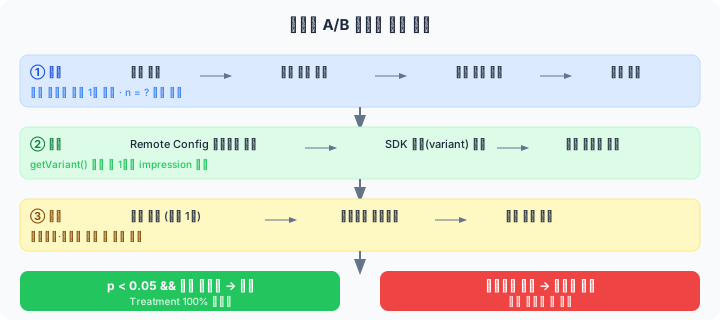
좋은 A/B 테스트는 시작 전에 설계가 90%다.
실험 설계 체크리스트
1. 가설 정의
   "새 체크아웃 플로는 [결제 전환율]을 [현재 대비 10%] 높인다"
   └─ 측정 가능한 지표를 하나만 정한다 (Primary Metric)

2. 샘플 크기 계산
   └─ 언제 실험을 끝낼 수 있는지 미리 계산한다

3. 가드레일 지표 정의
   └─ 건드리면 안 되는 지표 (예: 앱 크래시율, 고객 문의율)

4. 실험 기간 결정
   └─ 최소 1 비즈니스 사이클 (보통 1~2주)

5. 롤백 기준 정의
   └─ "크래시율이 0.5% 이상 증가하면 즉시 롤백"
샘플 크기 계산
통계적 유의미한 결과를 내려면 충분한 샘플이 필요하다.
import scipy.stats as stats
import math

def calculate_sample_size(
    baseline_rate: float,    # 현재 전환율 (예: 0.12 = 12%)
    mde: float,              # 최소 감지 효과 (예: 0.02 = 2%p 향상)
    alpha: float = 0.05,     # 유의수준 (Type I 오류율)
    power: float = 0.80,     # 검정력 (1 - Type II 오류율)
) -> int:
    """각 그룹(Control, Treatment)에 필요한 최소 샘플 수"""
    z_alpha = stats.norm.ppf(1 - alpha / 2)   # 양측 검정
    z_beta = stats.norm.ppf(power)

    p1 = baseline_rate
    p2 = baseline_rate + mde
    p_bar = (p1 + p2) / 2

    n = (z_alpha * math.sqrt(2 * p_bar * (1 - p_bar)) +
         z_beta * math.sqrt(p1 * (1 - p1) + p2 * (1 - p2))) ** 2 / (mde ** 2)

    return math.ceil(n)

# 예시
n = calculate_sample_size(
    baseline_rate=0.12,   # 현재 전환율 12%
    mde=0.015,            # 1.5%p 이상이면 감지하고 싶다
    alpha=0.05,
    power=0.80,
)
print(f"각 그룹 최소 샘플: {n:,}명")
# → 각 그룹 최소 3,623명 (총 7,246명 필요)
4. 실험 SDK 구현
Firebase Remote Config를 래핑해서 실험 로직을 캡슐화한다.
iOS
class ExperimentManager {
    private let remoteConfig = RemoteConfig.remoteConfig()
    private let analytics: Analytics

    // 실험 변형(Variant) 가져오기
    func getVariant(experimentKey: String) -> String {
        let variant = remoteConfig.configValue(forKey: experimentKey).stringValue ?? "control"

        // 노출(Impression) 기록 — 처음 variant를 읽을 때 한 번만
        logExposure(experimentKey: experimentKey, variant: variant)

        return variant
    }

    private func logExposure(experimentKey: String, variant: String) {
        // 중복 노출 방지 (세션당 1회)
        let exposureKey = "exposed_\(experimentKey)"
        guard !UserDefaults.standard.bool(forKey: exposureKey) else { return }
        UserDefaults.standard.set(true, forKey: exposureKey)

        Analytics.logEvent("experiment_exposed", parameters: [
            "experiment_key": experimentKey,
            "variant": variant,
        ])
    }
}

// 사용
class CheckoutViewController: UIViewController {
    private let experiments = ExperimentManager()

    override func viewDidLoad() {
        super.viewDidLoad()

        let variant = experiments.getVariant(experimentKey: "checkout_flow_v2")

        switch variant {
        case "treatment_a":
            setupNewCheckoutFlow()
        case "treatment_b":
            setupSimplifiedCheckoutFlow()
        default: // "control"
            setupCurrentCheckoutFlow()
        }
    }
}
Android
class ExperimentManager(
    private val remoteConfig: FirebaseRemoteConfig,
    private val analytics: FirebaseAnalytics,
    private val prefs: SharedPreferences,
) {
    fun getVariant(experimentKey: String): String {
        val variant = remoteConfig.getString(experimentKey).ifEmpty { "control" }
        logExposure(experimentKey, variant)
        return variant
    }

    private fun logExposure(experimentKey: String, variant: String) {
        val exposureKey = "exposed_$experimentKey"
        if (prefs.getBoolean(exposureKey, false)) return
        prefs.edit().putBoolean(exposureKey, true).apply()

        val bundle = Bundle().apply {
            putString("experiment_key", experimentKey)
            putString("variant", variant)
        }
        analytics.logEvent("experiment_exposed", bundle)
    }
}
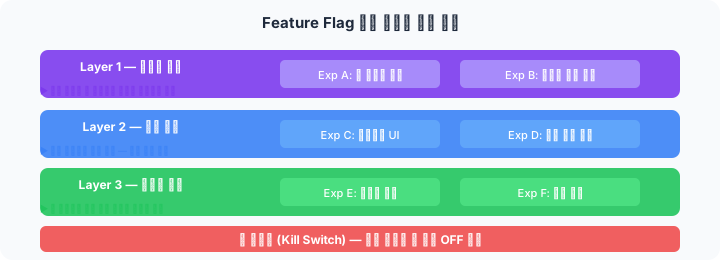
5. 실험 격리 (Experiment Isolation)
여러 실험이 동시에 진행될 때 서로 간섭하지 않도록 격리해야 한다.
실험 충돌 방지
레이어(Layer) 구조:

Layer 1: 온보딩 실험
  ├─ Exp A: 새 온보딩 플로
  └─ Exp B: 온보딩 스킵 버튼

Layer 2: 결제 실험
  ├─ Exp C: 체크아웃 UI 개선
  └─ Exp D: 결제 수단 순서 변경

규칙: 동일 레이어의 실험은 사용자가 하나에만 할당됨
      다른 레이어는 독립적으로 실험 가능
// Firebase Remote Config에서 레이어는 별도 파라미터 그룹으로 관리
// 또는 GrowthBook, Statsig 같은 전문 도구 활용
오염(Contamination) 방지
주의사항:

1. SUTVA 위반 방지
   - 한 사용자의 처리가 다른 사용자에게 영향을 주면 안 됨
   - 소셜 기능: 사용자 단위가 아닌 클러스터 단위 랜덤화 필요

2. 노벨티 효과
   - 새 기능이 새로워서 좋은 것인지 실제로 좋은 것인지 구분
   - 최소 2주 실험 권장

3. 계절성 편향
   - 결제일 근처 주, 명절 전후는 기준 데이터가 왜곡됨
6. 결과 분석
통계 검정
from scipy import stats
import numpy as np

def analyze_experiment(
    control_conversions: int,
    control_users: int,
    treatment_conversions: int,
    treatment_users: int,
) -> dict:
    control_rate = control_conversions / control_users
    treatment_rate = treatment_conversions / treatment_users

    # Z-검정 (비율 비교)
    counts = np.array([treatment_conversions, control_conversions])
    nobs = np.array([treatment_users, control_users])

    z_stat, p_value = stats.proportions_ztest(counts, nobs)

    relative_lift = (treatment_rate - control_rate) / control_rate * 100

    return {
        "control_rate": f"{control_rate:.2%}",
        "treatment_rate": f"{treatment_rate:.2%}",
        "relative_lift": f"{relative_lift:+.1f}%",
        "p_value": round(p_value, 4),
        "significant": p_value < 0.05,
        "recommendation": "Deploy" if (p_value < 0.05 and relative_lift > 0) else "No Change",
    }

# 예시
result = analyze_experiment(
    control_conversions=1200,
    control_users=10000,
    treatment_conversions=1380,
    treatment_users=10000,
)
print(result)
# {
#   "control_rate": "12.00%",
#   "treatment_rate": "13.80%",
#   "relative_lift": "+15.0%",
#   "p_value": 0.0003,
#   "significant": True,
#   "recommendation": "Deploy"
# }
의사결정 매트릭스
| p-value | 효과 방향 | 결정 |
|---|---|---|
| < 0.05 | 긍정적 | 배포 (Deploy) |
| < 0.05 | 부정적 | 롤백 (Rollback) |
| ≥ 0.05 | — | 유지 (Keep Control) 또는 실험 연장 |
7. Firebase A/B Testing 기본 기능 활용
Firebase는 Remote Config와 연동된 A/B Testing 콘솔을 기본 제공한다.
Firebase Console > A/B Testing > Create Experiment

설정 항목:
1. Name & Description
2. Target app & version
3. User segment (조건 설정)
4. Goal metrics (Primary + Secondary)
5. Variants (Control + 1개 이상 Treatment)
   └─ Remote Config 파라미터에 값 지정
장점: GA4 이벤트와 자동 연동, 통계 계산 내장
한계: 복잡한 멀티 레이어 실험, 사용자 정의 통계 방법에는 한계가 있음. 규모가 커지면 Statsig, GrowthBook, LaunchDarkly 도입 검토.
8. 실험 운영 원칙
| 원칙 | 설명 |
|---|---|
| 하나의 변수 | 실험당 하나의 변수만 변경한다 |
| 사전 분석 금지 | 샘플이 충분히 모일 때까지 결과를 보지 않는다 (p-hacking 방지) |
| 가드레일 모니터링 | 크래시율, 에러율은 매일 확인한다 |
| 실험 문서화 | 가설, 결과, 의사결정을 기록한다 (팀 학습 자산) |
| 이기면 배포, 지면 학습 | "실패한 실험"도 귀중한 데이터다 |
마치며
A/B 테스트의 진짜 가치는 "이 기능이 실제로 효과 있는가"에 데이터로 답하는 것이다. Firebase Remote Config로 시작해 실험 SDK를 래핑하고, 통계 검정으로 결과를 분석하는 파이프라인을 갖추면 팀의 의사결정 속도와 신뢰도가 함께 높아진다.
샘플 크기 계산과 실험 기간을 미리 정하는 습관이, "지금 유의미한가요?"라는 불필요한 논쟁을 없애는 가장 좋은 방법이다.